


Mob: Meal Planner and Recipes
4.08.00 Reviews
App Specs
- Version
- 1.18.0
- Updated On
- License
- Free
- Downloads
- 100,000+
- Developer
- Mob.co.uk
- Categories
- Food & Drink
- Platform
- Android
Screenshots
 Analysis by AppCompare
I find Mob: Meal Planner and Recipes most useful when the hardest part of cooking is deciding what to make, not the actual cooking. It brings recipes and a weekly plan together, so I can think ahead instead of making a last-minute choice while hungry. That shift sounds small, but it can make home cooking feel much more manageable on busy days.
Where a connection matters in the routine
Because the app is built around recipes and planning, I’d treat a reliable connection as part of the browsing experience, especially when exploring dishes or moving between recipe content and the plan. I wouldn’t make assumptions about what remains available without a network. My practical advice is to choose meals and check the details before heading out to shop or cook, rather than leaving all the decisions until you’re standing in a supermarket aisle.
That workflow also helps when you’re sharing shopping duties. If one person chooses the meals and another picks up ingredients, agree on the plan while you’re both able to check it. A recipe-led list is more useful than a hurried message saying “get something for dinner,” but it still takes a little coordination to avoid buying for a meal that has since changed.
Best suited to a real week, not an ideal one
I can picture using Mob on Sunday evening: I look at the week ahead, pick a few recipes that seem realistic, and build a shopping trip around them. On a late workday, I can then follow the chosen recipe rather than start from a blank page. The key is not to plan every meal as if I’ll have unlimited time. Mixing an easy dish with a more involved one makes the plan more likely to survive a busy week.
This approach is particularly helpful if you’re learning to cook or trying to expand beyond a short list of familiar dinners. The recipe guidance can make a new dish feel less intimidating, while the planner gives it a place in the week. If you already have a dependable rotation and enjoy improvising from whatever is in the cupboard, though, a dedicated planner may feel like extra administration rather than a benefit.
How it differs from recipe browsing and notes
The usual alternative is to search for recipes wherever they appear, save a few in different places, and keep a shopping list in a notes app or on paper. That can work perfectly well, but it spreads decisions across several tools. Mob’s appeal is the link between choosing food and planning to make it. I’d choose it when I want that connected routine; I’d stick with a simple list if I only need to remember a handful of ingredients.
There is a trade-off: a structured planner asks you to make choices earlier. That’s helpful for shopping and reducing the nightly “what now?” question, but it can be restrictive if plans change often or if you prefer to decide dinner based on your mood. I’d leave some flexibility in the week instead of treating the plan as a rulebook.
Worth Reading Before You Choose

EA SPORTS FC Mobile 26 Is a Bigger Football Game, but It Takes Time

Flipboard Shows What News Apps Must Do Beyond the Feed

Switching to Android Auto Means Rethinking Your Driving Routine

Google Calendar Makes a Crowded Week Easier to Manage

Ludo King Makes the Most of the Minutes Between Plans

Baby Panda World Brings Quick Play to Modern Phones, but Its Game Library Feels Busy
What’s Cooking with Mob?
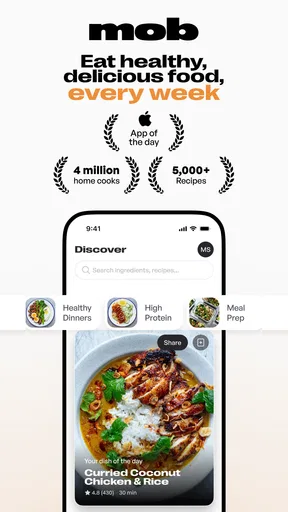
The first thing that struck me about Mob: Meal Planner and Recipes is its clean, intuitive interface. From the moment you open it, you feel like you’re stepping into a well-organized kitchen. No clutter, just straightforward access to recipes and meal planning tools. The app’s designed to make meal prep a breeze for everyone, whether you’re a seasoned chef or a kitchen newbie.
Features That Sizzle
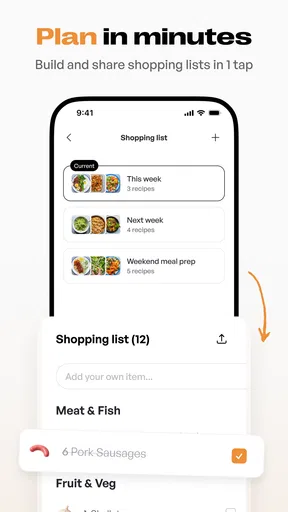
One of the standout features is the meal planner. You can easily plan your meals for the week, and the app generates a shopping list for you. I mean, who doesn’t love a bit of efficiency? No more scribbling down items on random pieces of paper or forgetting the crucial ingredient. Just add meals to your planner, and the app does the rest.
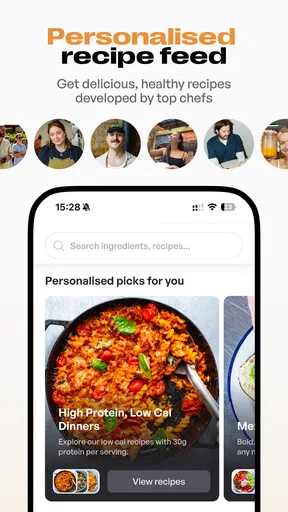
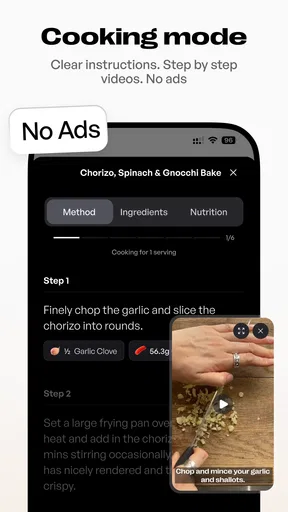
Now, let's talk recipes. Mob is packed with a variety of dishes that cater to all tastes and dietary needs. From vegan delights to hearty meat-based meals, there’s something for everyone. What I love most is the step-by-step guides with stunning photos at each stage, making it almost impossible to mess up.
Cooking with Confidence
If you’re someone who struggles with confidence in the kitchen, Mob has your back. The app not only provides detailed instructions but also includes helpful tips and tricks to improve your cooking skills. I found the little nuggets of wisdom sprinkled throughout the recipes super helpful. For instance, learning how to properly chop an onion might sound basic, but it’s a game-changer!
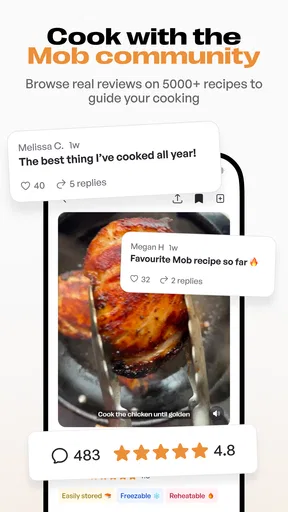
Another feature that deserves a mention is the community aspect. You can save your favorite recipes, leave reviews, and even share your own culinary creations with other users. It’s like having a cooking club right in your pocket!
Spicing Up Your Meal Routine
One of the challenges I often face is falling into a meal rut, cooking the same few dishes on repeat. Mob effortlessly solves this issue with its diverse range of recipes and the ability to discover new dishes based on your preferences. It’s like having a personal chef curating new experiences for your taste buds.
Moreover, the app takes sustainability into account with recipes that encourage using up leftovers and minimizing waste. This not only saves money but also helps the planet—a win-win in my book!
Connectivity in the kitchen
When I’m actually cooking, I prefer to get ingredients ready before starting the first step. That matters with a recipe app because switching between instructions and a busy kitchen can be awkward, especially when I’m moving between rooms or keeping an eye on more than one pan. I’d use the recipe guidance to prepare a small “mise en place”: gather the ingredients, check the steps, and only then begin. It makes the phone a reference point instead of something I need to handle constantly with messy hands.
If a page takes time to load or the connection drops, I’d avoid relying on a last-second recipe search to rescue dinner. Choose the dish earlier and keep the basic method in mind before you start. This is not a claim that the app works offline; it is simply a sensible way to reduce frustration when cooking depends on a screen and a network.
Small habits that make the planner more useful
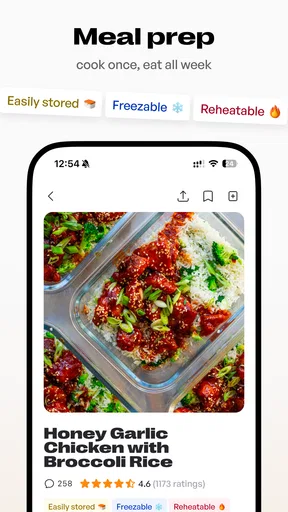
A weekly plan is only as good as the assumptions behind it. Before adding several recipes, I’d check which evenings are genuinely free, then reserve the more involved cooking for a night when there is time. I’d also look for ingredients that appear across more than one chosen meal. That can make a shop more coherent and reduce the chance of buying a one-off item that sits unused.
Another useful habit is to distinguish between a recipe you want to try and one you can confidently cook on a rushed evening. Saving something appealing is not the same as committing to make it tomorrow. I’d use the planner for dishes I’m reasonably sure I’ll cook, and keep adventurous ideas for a quieter day. That small separation helps a plan stay practical instead of turning into a list of good intentions.
When the plan meets real life
Plans change: a meeting runs late, someone eats elsewhere, or an ingredient is missing. I’d treat the shopping list as a guide to the meals I chose, not as a guarantee that every item will be available or that every dinner must happen exactly as planned. If a change comes before shopping, revise the intended meals first; if it comes after, use the ingredients that need attention soon and move the more flexible dish to another day.
This is where a paper note or a basic phone list can still be useful alongside a planner. I might jot down a substitute or a reminder while shopping rather than repeatedly revisiting the whole plan. Mob helps organize recipe-based decisions, but it cannot make a household’s schedule predictable. Keeping one open evening in the week is a realistic buffer, not a failure to plan.
Choosing it with your household in mind
For a solo cook, the main question is whether planning ahead reduces stress enough to justify the setup. For a household, it can help turn dinner from one person’s daily responsibility into a shared decision, provided everyone is willing to agree on meals. If tastes differ sharply, the range of recipes may offer inspiration, but a planner cannot automatically settle arguments about what sounds good tonight.
I’d also be cautious about treating broad recipe variety as a substitute for checking individual dishes against a household’s needs. If someone has a strict dietary requirement, read each recipe carefully and make your own judgement before cooking. The app can inspire choices; the cook still needs to verify that a particular meal is suitable for everyone at the table.
What the cost and platform details mean
Mob is a free download, which makes it easy to try the planning style before deciding whether it fits your routine. It also offers in-app purchases, with listed items ranging from $8.99 to $59.99. I’d check what an item includes in the app before paying and decide whether those extras solve a real need for me. The basic decision is less about the headline price and more about whether I will use a meal planner consistently.
The app is made by Mob.co.uk and is rated for Everyone. It has an average rating of 4.2 from around 830 ratings, with over 100,000 installs. It launched in August 2024, and version 1.16.27 is listed for devices running Android 8.0 or later. Those details make it straightforward to judge whether it suits your device and whether other users have shown interest, but they do not replace trying the actual planning flow for yourself.
Who should look elsewhere
I’d skip a structured recipe planner if I rarely cook at home, prefer spontaneous meals, or already have a system that keeps recipes and groceries in order. Someone who wants a highly flexible pantry tracker or a custom nutrition tool should choose an app designed specifically for those jobs rather than assume Mob is meant to cover every food-related task. Its strongest fit is narrower and more practical: finding recipes and turning selected meals into a plan.
It may also be the wrong choice if you need a dependable cooking reference in places where you expect little or no connectivity. Since I wouldn’t assume offline access, I’d test the experience before relying on it for a trip or a kitchen with unreliable service. Downloading an app is not the same as confirming that every recipe and planning feature will be available without a connection.
Final Thoughts: Is It Worth a Download?
So, after a week of cooking with Mob, I can honestly say it’s revolutionized my approach to meal planning. It’s easy to navigate, packed with flavorful recipes, and offers a seamless planning experience—all while looking great on my phone screen! Whether you’re looking to spice up your weekly meal routine or just need a helping hand in the kitchen, Mob: Meal Planner and Recipes is definitely worth a download.
So, what are you waiting for? Give it a whirl, and let your culinary adventures begin!
My connectivity verdict
For me, Mob makes the most sense when I can browse recipes and settle on meals before the pressure of dinner time. The planner and shopping list bring real value when they shape a shop and make weekday cooking easier, while the recipe guidance gives a new dish a clearer path from idea to plate. I’d keep a little room for changes and avoid assuming the app can replace a backup note when the network is uncertain.
Overall, I’d recommend giving it a try if you want a practical bridge between recipe inspiration and a week of home cooking. Its usefulness depends on habits as much as features: plan realistically, check what you need ahead of time, and choose another tool if your priority is a specialist function or guaranteed access without a connection. Used that way, it can be a helpful companion rather than another source of pressure.
Pros
- Intuitive user interface for easy navigation.
- Extensive recipe database with diverse cuisines.
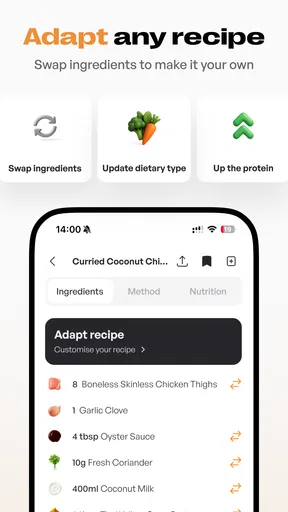
- Customizable meal plans to suit dietary needs.
- Integration with grocery lists for convenience.
- Offline access to saved recipes.
Cons
- Limited free features; subscription required.
- Occasional syncing issues with accounts.
- No integration with fitness tracking apps.
- Ads can be intrusive in the free version.
- Lacks support for some niche dietary plans.
FAQs for Mob: Meal Planner and Recipes
What features does Mob: Meal Planner and Recipes offer?
Mob: Meal Planner and Recipes provides an extensive range of features, including customizable meal planning, a diverse recipe library, and a shopping list generator. Users can search for recipes based on dietary preferences, save their favorite meals, and even adjust serving sizes. The app aims to simplify meal prep and reduce food waste.
Can Mob: Meal Planner and Recipes cater to specific dietary needs?
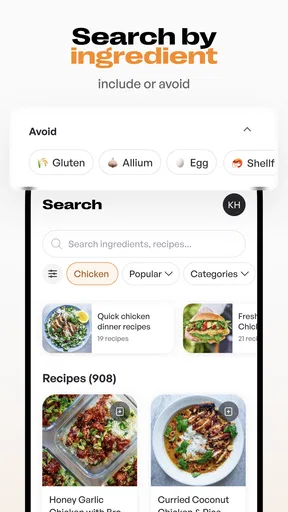
Yes, Mob: Meal Planner and Recipes has filters for various dietary preferences, such as vegan, vegetarian, gluten-free, and keto. Users can easily find recipes that align with their dietary restrictions and lifestyle choices. The app helps ensure that users can enjoy a variety of meals without compromising their dietary requirements.
Is an internet connection required to use Mob: Meal Planner and Recipes?
While an internet connection is required to initially download and update the app, Mob: Meal Planner and Recipes offers offline access to saved recipes and meal plans. Users can prepare and plan their meals without needing continuous internet access, making it convenient for on-the-go meal planning.
How user-friendly is Mob: Meal Planner and Recipes for beginners?
Mob: Meal Planner and Recipes is designed with an intuitive interface that makes it easy for beginners to navigate. The app offers step-by-step guides, ingredient lists, and cooking instructions, ensuring a seamless cooking experience. Users can quickly become proficient in planning and preparing meals using the app's straightforward design.
Does Mob: Meal Planner and Recipes have a cost associated with it?
Mob: Meal Planner and Recipes is free to download, with optional in-app purchases available for users wishing to access premium features. These may include advanced meal planning options, exclusive recipes, and ad-free browsing. Users can choose whether they want to upgrade their experience based on their personal needs.


